SASE implementation is a five-phase process that involves baseline assessment, architecture design, policy modeling, phased deployment, and continuous optimization. Each phase builds on identity, application needs, and network readiness.
Success depends on enforcing access policies consistently while migrating from legacy infrastructure to a unified, cloud-delivered framework.
What it actually takes to implement SASE
A lot of SASE implementation advice sounds familiar: define your goals, assess your environment, pick a vendor, start small.
Those steps aren't wrong. But they don't explain why so many rollouts still go sideways even when those steps are followed.
Here's the thing.
The real challenges aren't about planning. They're about execution. Identity alignment. Policy enforcement. Change control. Observability. And the mismatch between how platforms are designed—and how real environments actually work.
That's why this guide goes deeper than a planning checklist.
It breaks down what it actually takes to implement SASE: how to sequence the rollout, choose an architecture model, structure policies, and integrate the tools that make it operational.
Because SASE isn't a one-time rollout. It's a long-term shift.
It means knowing what to deploy first. Where legacy coexistence is required. And how to design for ongoing change.
The sections that follow walk through it step by step.
How to successfully execute a SASE implementation
Implementing SASE is not a single action. It's a staged transformation.
Which means you need a structure that helps you move from initial discovery to full operational maturity without breaking the environment along the way.
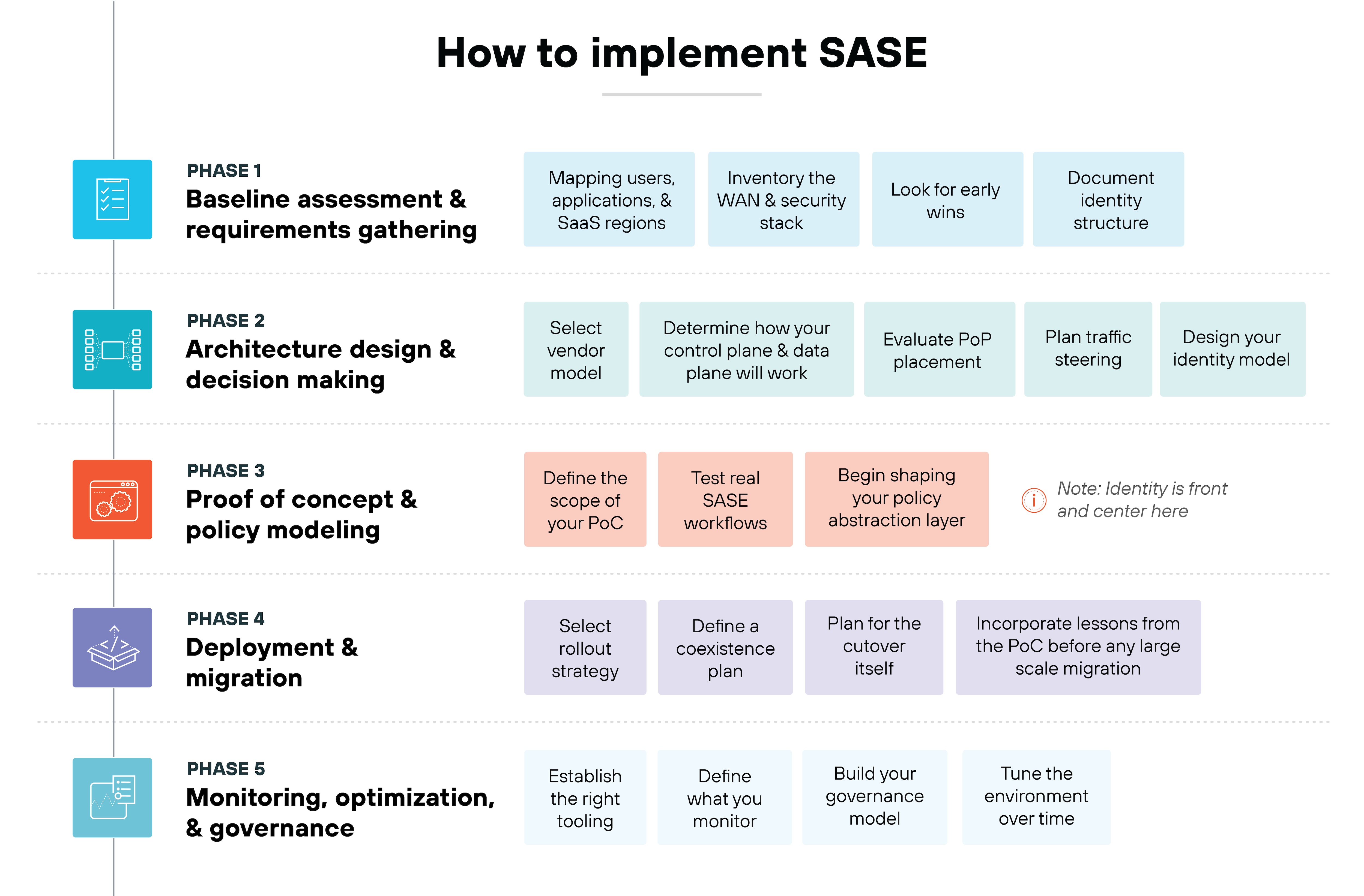
The five phases below follow how real SASE programs unfold.
Let's walk through each phase one step at a time.
Phase 1: Baseline assessment and requirements gathering
The first phase is about understanding how your environment works today.
Start by mapping your users, applications, and SaaS regions.
Identify who needs access to what. Observe where traffic enters and leaves the network. Chart how cloud services are used across business units.
Next, inventory the WAN and security stack.
That includes MPLS, VPN concentrators, existing SD‑WAN, firewalls, and any cloud security layers already in place. This helps you understand what SASE will replace, what it will augment, and what must run in parallel for a period of time.
Then look for early wins.
These are areas where SASE delivers immediate value without high risk. For example, high‑latency VPN paths. Overloaded branch links. SaaS traffic bottlenecks caused by backhauling.
Finally, document your identity structure.
That means your IdP, group structure, device trust signals, MFA posture, and RBAC gaps. SASE depends heavily on identity, so you need a clean foundation before anything else begins.
Tools & telemetry:
Export app usage and identity logs from your IdP, VPN, and proxy.
Capture MPLS utilization, VPN tunnel volumes, and ingress and egress points.
Use NPM tools such as NetFlow or SD‑WAN analytics to trace where latency hits users.
Tip:
Don't skip app or user mapping. Blind spots here lead to major PoP placement issues and long‑term performance problems. You can't optimize what you haven't inventoried.
Phase 2: Architecture design and decision‑making
This phase defines how your SASE platform will be built. It's where you decide what you want SASE to look like in your environment.
First, select your vendor model.
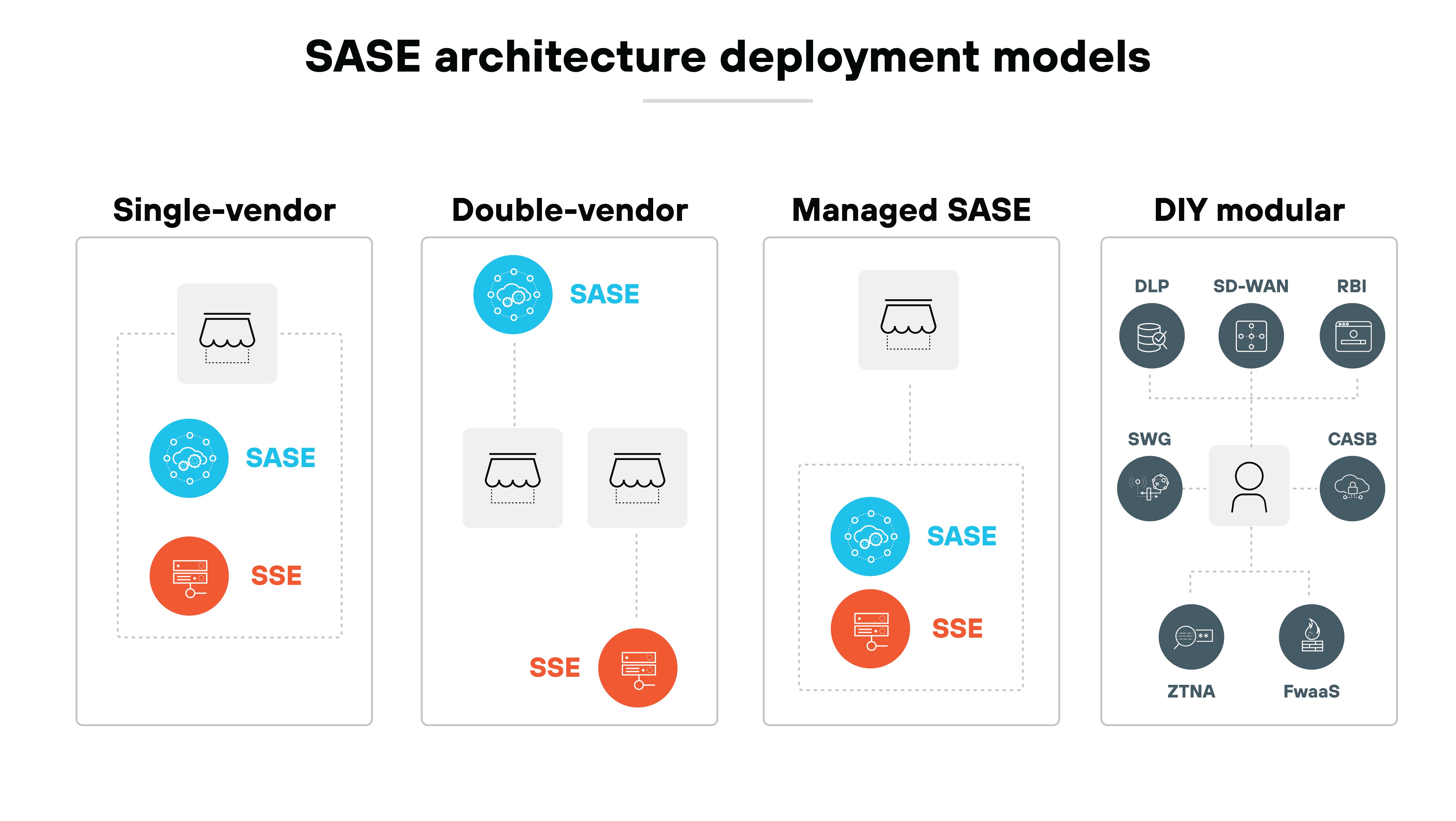
Single‑vendor SASE is simpler. Dual‑vendor SASE offers flexibility. Managed SASE can reduce operational load. DIY modular architectures give maximum control but require more internal skill. None are universally better. They each succeed in different conditions. (More on this in a later section.)
Next, determine how your control plane and data plane will work.
That includes whether policy decisions live centrally or are distributed. It determines how enforcement points talk to each other. It affects troubleshooting and visibility.
Then evaluate PoP placement.
User geography, app hosting regions, and cloud service footprints all influence latency paths. The platform needs to be geographically aligned with how your traffic actually flows.
Plan traffic steering.
Decide where dedicated internet access (DIA) makes sense. Decide where backhaul is still needed. Tune BGP and DNS strategy for SASE‑routed traffic.
Finally, design your identity model.
That includes SAML or OIDC. It includes device trust requirements. It includes MFA. It includes conditional access. These choices shape how ZTNA and SWG enforcement will work.
Tools & telemetry:
Determine what telemetry the architecture provides. For example, whether you receive per‑session ZTNA logs.
Design log flows for SWG, CASB, ZTNA, SD‑WAN, and identity sources.
Ensure PoP availability metrics and routing telemetry are accessible via API or dashboard.
Tip:
Don't assume 'vendor-managed' means hands off. Most default templates won't reflect your identity model, security posture, or traffic needs. You still have to define and maintain the policy model yourself.
Phase 3: Proof of concept and policy modeling
Phase 3 is where implementation moves from theory to reality.
Begin with defining the scope of your PoC.
Choose the use cases, users, applications, and metrics that will validate whether the platform works as expected. Build a PoC playbook. Define duration. Define success criteria. Define a rollback plan.
Next, test real SASE workflows.
For example, remote ZTNA access. Branch internet breakout. Or third‑party access. Each of these validates policy enforcement, routing paths, and user experience.
In parallel, begin shaping your policy abstraction layer.
This is when you define what “an application” means in your environment. Determine which user groups interact with which classes of apps. Establish policy ownership. And decide how rules move from design → approval → enforcement.
Identity is front and center here.
Group structure. Device trust. Application naming. User attributes. These all influence how ZTNA, SWG, and CASB operate across every edge.
Tools & telemetry:
Instrument everything: session logs, auth logs, blocked flows, and latency.
Run packet captures when performance issues arise.
Set up dashboards to visualize PoC KPIs such as connectivity, policy hits, block rates, and success or failure patterns.
Tip:
Watch for identity misalignment. Inconsistent groups, device signals, or app definitions often cause access failures—or worse, over-permissioned users.
Phase 4: Deployment and migration
Now you begin full deployment. This phase determines how your live environment begins shifting from legacy access models to SASE‑driven ones.
Select your rollout strategy.
Some teams prefer a phased approach. Others choose region‑first. Others choose function‑first. The right approach depends on the structure of your workforce, your WAN, your regulatory requirements, and the tolerance for coexistence.
Define a coexistence plan.
You might need dual access paths for a period of time. For example, VPN and ZTNA running together. MPLS and DIA operating in parallel. This protects you from premature cutovers.
Plan for the cutover itself.
Routing. DNS changes. App readiness. Edge device upgrades. Client deployment. These steps need to be staged and reversible.
Finally, incorporate lessons from the PoC before any large‑scale migration.
The PoC gives you patterns. It gives you performance insights. It gives you operational warning signs. Use these to refine your playbook.
Tools & telemetry:
Monitor cutover success with real‑time traffic flow visualizations.
Track ZTNA sessions compared to legacy VPN usage during coexistence.
Validate DNS resolution paths, TLS handshake errors, and failed app connections.
Alert on any fallback to unmanaged or unknown paths.
Tip:
Don't launch without a rollback plan. Many cutovers fail because routing or DNS behaves differently under production load.
Phase 5: Monitoring, optimization, and governance
The final phase is about running SASE as a permanent operational framework. Now you shift from deployment to continuous improvement.
First up, establish the right tooling.
SIEM. UEBA. NPM. Identity telemetry. Audit logging. These systems help you monitor performance, detect anomalies, and track how policies evolve over time.
Then define what you monitor.
Latency. Drop rate. PoP reachability. Traffic steering decisions. MPLS vs. DIA cost impacts. ZTNA vs. VPN fallback. Each metric tells you something about adoption and coverage.
Next, build your governance model.
Assign ownership for policy changes. Structure approval workflows. Define SLAs. Define review gates. Align network and security teams around access engineering.
Last, tune the environment over time.
Applications change. User behavior changes. Network paths change. SASE gives you the tools to adjust policies and routing faster than legacy architectures ever allowed.
Tools & telemetry:
A full log ingestion pipeline spanning SWG, CASB, ZTNA, FWaaS, SD‑WAN, and identity.
SIEM or SOAR integration for anomaly detection and incident response.
SLA dashboards for latency, error rates, and PoP health.
Audit logs for policy drift or unauthorized changes.
UEBA monitoring for unexpected user behavior.
Tip:
Prioritize log correlation across ZTNA, SWG, and SD‑WAN. It's the only way to avoid blind spots in troubleshooting and prevent policy drift from going unnoticed.
How to choose the right SASE architecture for your organization
Not every organization starts from the same place. And not every SASE architecture works the same way.
That's why you'll need to match your deployment model to how your teams operate, how your vendors integrate, and how much complexity you're prepared to manage.
There's no one right answer. But there are clear patterns.
Option 1 — Single-vendor full stack
Best if you want one policy engine, one UI, and full-stack coverage with minimal integration effort.
In this model, the SASE platform comes from a single vendor and includes SD-WAN, SWG, CASB, ZTNA, and FWaaS. Everything runs through a unified management plane.
It's easier to deploy. Easier to support. And easier to monitor.
Tip:
A single-vendor platform means full dependency on one roadmap. So pick a vendor with strong alignment to your long-term goal. Note that customization can be limited if the platform prioritizes simplicity over control.
Option 2 — Best-of-breed dual-vendor
Best if you want to pair a preferred SD-WAN solution with an SSE vendor and are comfortable managing two control planes.
This model gives you more flexibility. Especially if you already have an SD-WAN provider in place or want to preserve a security partner relationship.
But you'll need to plan for integration. That includes syncing identity, aligning policies, and resolving differences between logging formats and enforcement behavior.
This model works best when your internal teams already have some experience managing multi-vendor infrastructure.
Option 3 — MSP-managed portfolio
Best if you want a simplified experience, outsourced complexity, and unified support. Especially in teams without deep in-house expertise.
In this model, a service provider manages your SASE stack across multiple vendors. You get one support line. One consolidated policy surface. And someone else handles integration.
It's attractive for organizations with limited internal resources or fragmented IT coverage across geographies.
Note:
You lose visibility and direct control. If troubleshooting is a priority—or if regulatory requirements limit third-party management—this may not be the right model.
Option 4 — DIY modular
Best if you need full customization, control, and vendor flexibility but have the resources to build and operate it yourself.
This model gives you maximum architectural control. You choose each component: SD-WAN, SSE, observability, policy enforcement—and integrate them directly.
That also means full responsibility for orchestration. Policy drift becomes your problem. So does log correlation. And enforcement consistency.
It's rare. But it works for large, mature teams with complex environments or regulatory constraints.
Key takeaway:
There's no wrong starting point. Many organizations evolve from one model to another over time. What matters most is choosing an architecture that fits your operational maturity today. And gives you space to adapt later..
What does the SASE rollout timeline actually look like?
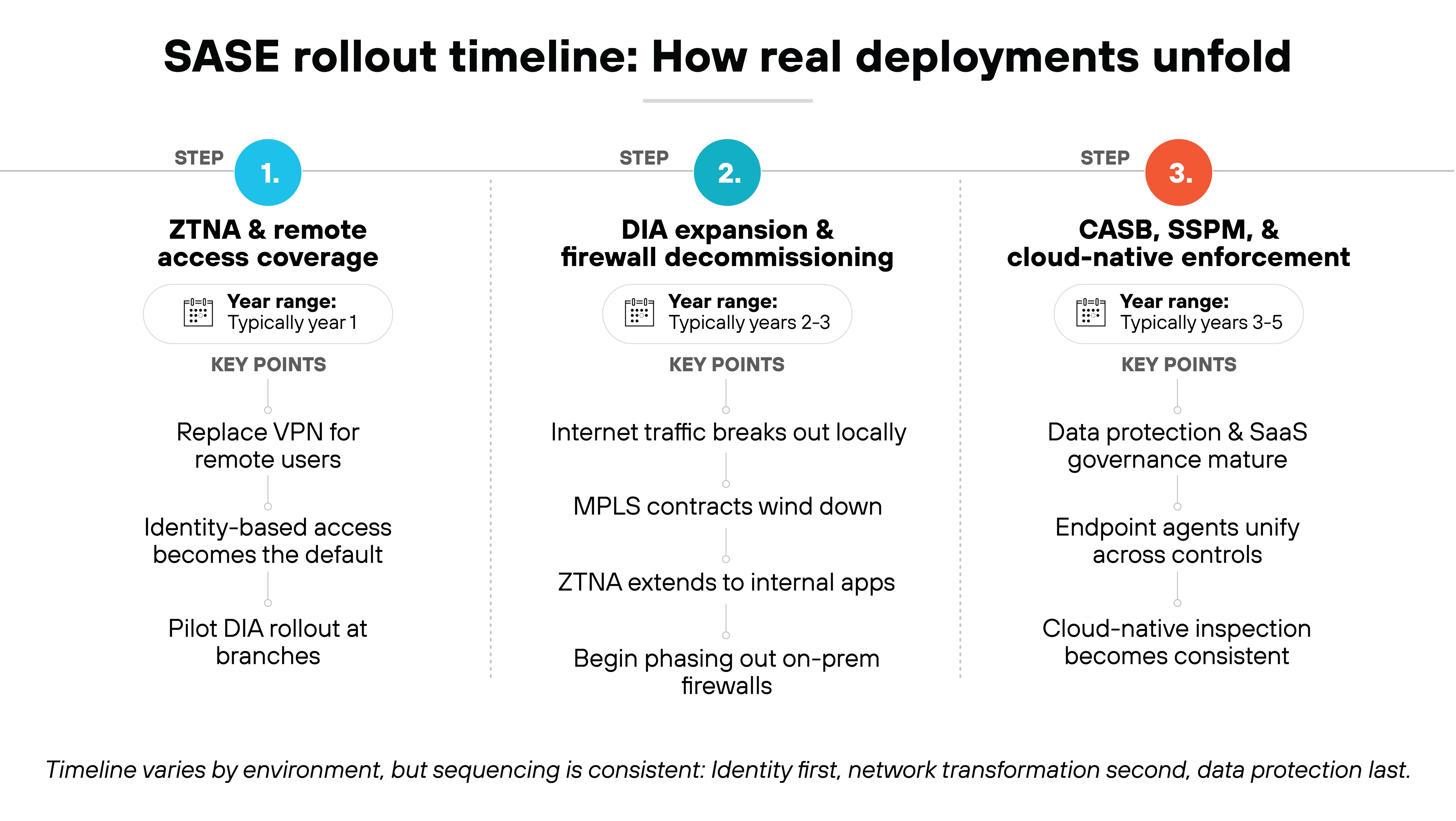
SASE isn't deployed all at once. It's a staged journey that usually unfolds over several years.
Each phase builds on the one before it, based on infrastructure readiness, team maturity, and priority use cases.
In other words: you move through capability layers, not fixed dates.
Here's what it looks like.
Stage 1: ZTNA and remote access coverage (typically year 1)
The first step is replacing VPN for remote users. Identity-driven access becomes the default. Some pilot branches may begin testing direct internet access to reduce backhaul and observe performance gains.
Stage 2: DIA expansion and firewall decommissioning (typically years 2–3)
Internet-bound traffic starts breaking out locally. MPLS contracts begin to wind down. ZTNA is extended to internal applications. Some on‑premises firewalls are removed as traffic shifts to cloud-delivered inspection.
Stage 3: CASB, SSPM, and cloud-native enforcement (typically years 3–5)
Data protection becomes a focus. SaaS usage is governed more granularly. Endpoint agents begin to unify across access and security controls. Traffic inspection becomes consistent across users, branches, and cloud environments.
Timelines vary by organization. But the sequence stays the same. Identity first. Network transformation second. Data protection and cloud-native enforcement last.
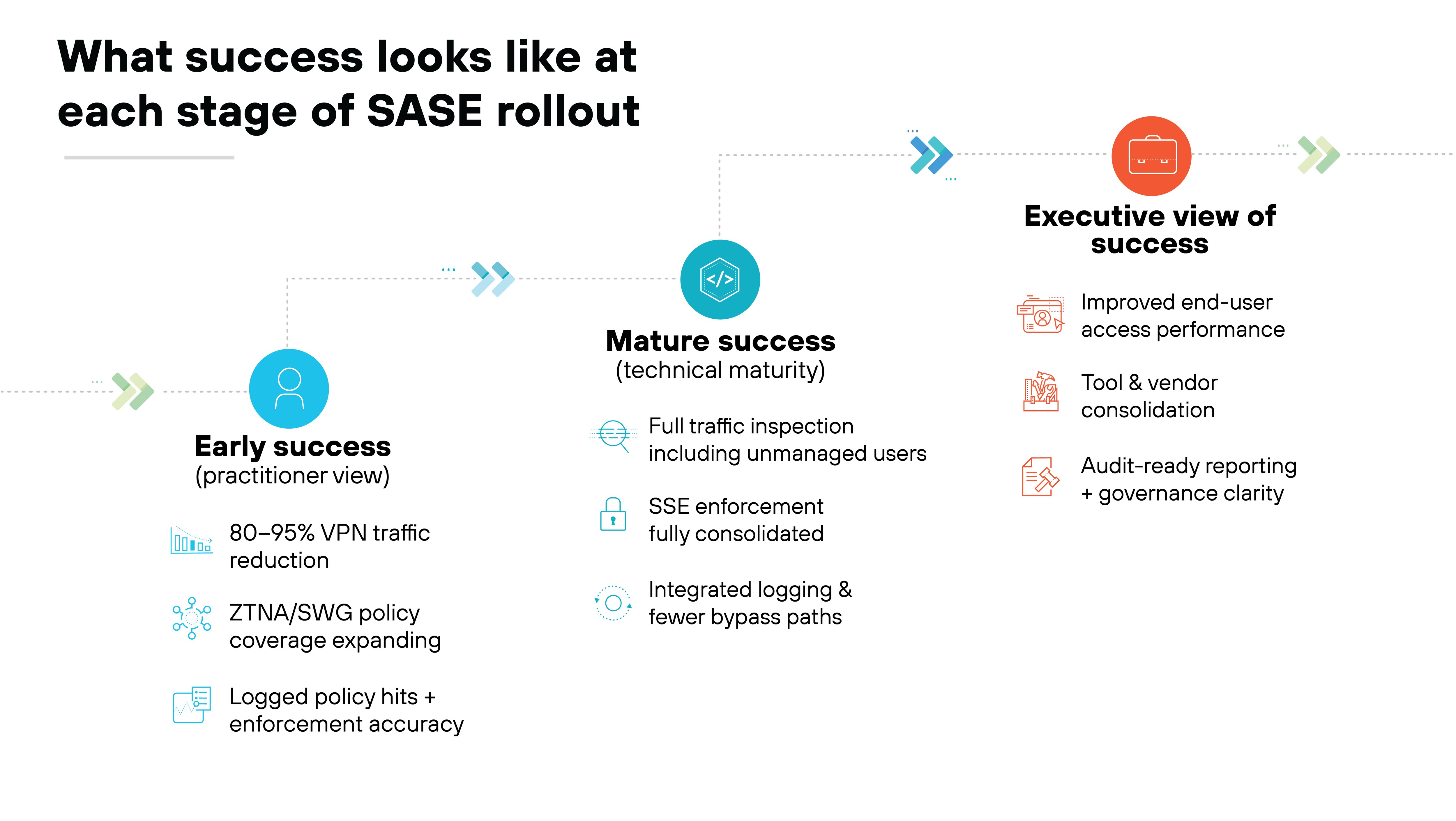
What defines a successful SASE rollout?
Going live with a SASE platform doesn't mean the job is done.
Success depends on what changes after deployment and whether those changes are measurable. That includes early coverage targets, operational maturity, and stakeholder alignment.
Practitioner teams often define early success by the percentage of VPN traffic they've retired.
A common target is 80–95% reduction in the first few years.
Success also shows up in enforcement: how much traffic is covered by ZTNA or SWG, how reliably policy hits are logged, and whether coverage has expanded beyond remote users to internal apps and branch sites.
As the deployment matures, the signals change.
You should see full traffic inspection including unmanaged or mobile users.
Policy enforcement should consolidate across SSE functions.
Logging pipelines should be integrated.
And bypass paths should shrink or disappear entirely.
Executives will ask different questions.
Are users getting faster, more reliable access?
Are security and networking teams relying on fewer tools?
Is the environment more predictable and easier to report on for audit or governance?
The most successful SASE rollouts are the ones that deliver outcomes everyone can measure and agree on.
What does a real SASE policy model look like in practice?
SASE isn't just about routing traffic through cloud PoPs. It's about enforcing access based on identity, risk, and context at every edge.
That means your policy model needs to reflect who the user is, what they're accessing, how sensitive the traffic is, and where enforcement actually happens.
Most organizations define policy tiers based on combinations of users, apps, and data categories. Enforcement then happens through ZTNA, SWG, CASB, and FWaaS—depending on the use case.
Here's what a real-world structure might look like:
Example SASE policy model
Identity group
App type
Traffic category
Policy tier
Sample rules
Enforcement point
Policy owner
Employees
Public SaaS (e.g. O365)
Low-risk browsing
Standard user
Allow outbound access, inspect with SWG, block file uploads
PoP
Security team
Contractors
Internal dev tools
Sensitive data
Restricted access
Require ZTNA + MFA, allow read-only access, log all sessions
Client + PoP
App owner
Admins
HR systems
High-sensitivity uploads
Privileged + approval
Just-in-time access, log full session, enable DLP inspection
Client + on-prem
Security + HR jointly
Third parties
Finance systems
Regulated content
Limited & monitored
ZTNA with IP restrictions, no uploads, DLP alerting and auto-logoff
PoP + CASB
Risk + compliance teams
BYOD users
General internet access
Untrusted destinations
Guest access
SWG only, no uploads or downloads, no internal app access
PoP only
Security + IT jointly
In mature environments, these policies aren't hardcoded into individual apps or locations.
They're abstracted and centrally enforced, usually through a combination of ZTNA and SWG policies mapped to identity groups and traffic classification.
But enforcement still needs cross-team agreement. Policy ownership typically spans app owners, security leads, and compliance stakeholders depending on the risk involved.
This is where SASE becomes more than a network upgrade.
It becomes a control framework. One that replaces fragmented access control lists (ACLs) and manual VPN provisioning with real-time, identity-based enforcement that works everywhere users connect.
VIRTUAL ULTIMATE TEST DRIVE
Sign up for a hands-on, in-depth experience of Prisma® SASE.
Does SASE actually replace everything you already have?
Not always. And assuming it does can derail your rollout before it even starts.
SASE typically replaces legacy access infrastructure:
VPN concentrators, MPLS backhaul, branch firewalls, and standalone secure web gateways. That's where the biggest operational and performance gains tend to come from.
Others run in parallel for months or years. For example, you might deploy ZTNA for remote workers while keeping VPN for internal developers until full app segmentation is complete.
The key is knowing what SASE can displace cleanly. And where coexistence still makes sense.
PERSONALIZED DEMO: PRISMA SASE
Schedule a demo with a specialist to see how Prisma SASE protects all users, apps, data and devices.
You deploy SASE in phases: assess your environment, select an architecture model, integrate identity, run a scoped PoC, migrate users and branches gradually, and centralize monitoring and policy enforcement. Rollouts typically begin with ZTNA, followed by network transformation and full SSE integration.
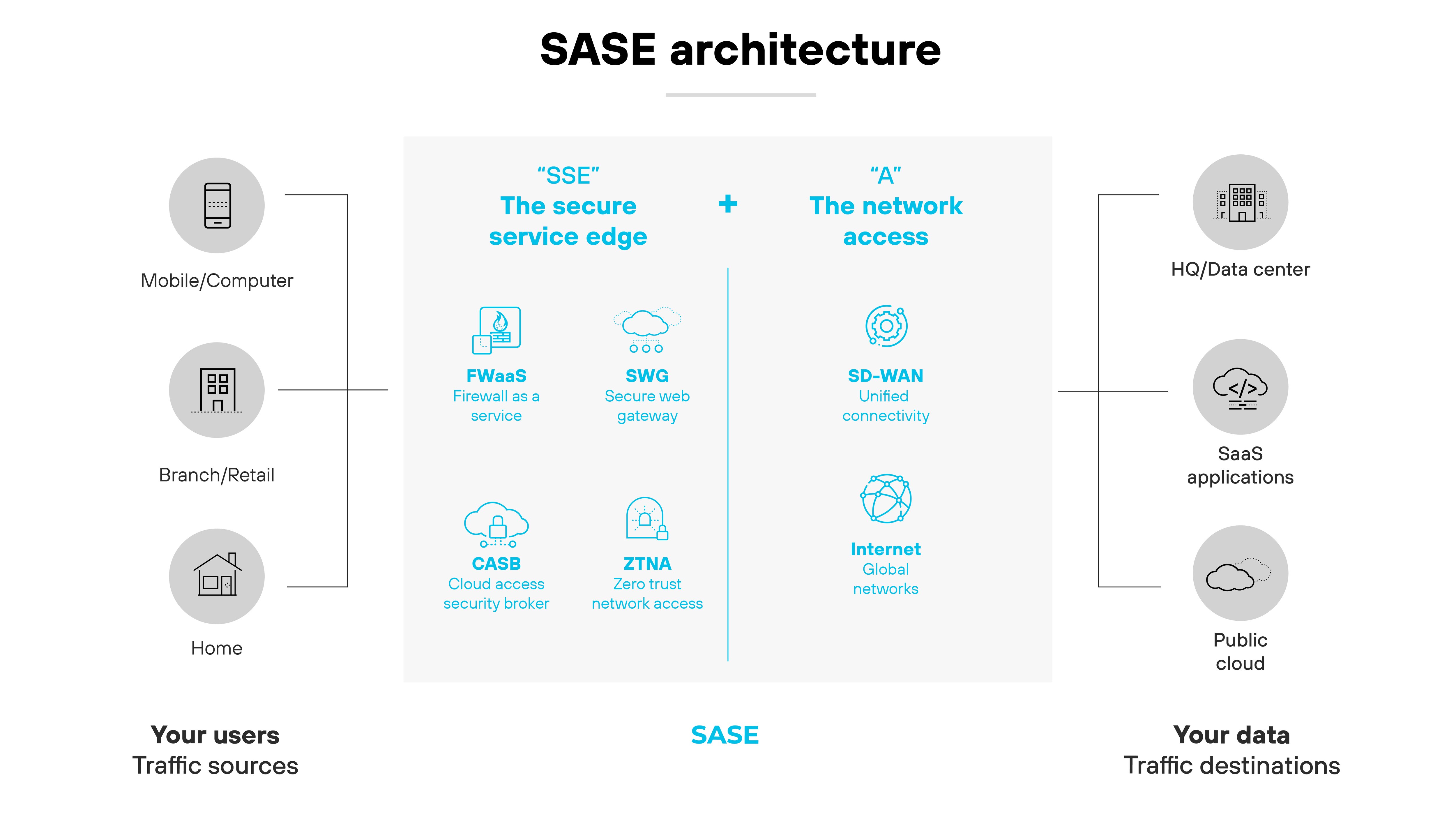
Core cloud-delivered capabilities include ZTNA for application access, SWG for internet filtering, CASB for SaaS governance, and FWaaS for cloud-based L7 inspection. These must be unified through a single policy framework and globally distributed enforcement.
SASE typically replaces VPN concentrators, MPLS backhaul, branch firewalls, and legacy SWGs. It doesn’t replace data center NGFWs, OT firewalls, deep DLP, or SIEM. Many environments run SASE and legacy controls in parallel during transition.
SASE maturity typically unfolds over 3 to 5 years. Organizations often start with ZTNA, then expand to DIA and firewall consolidation, followed by full data protection and cloud-native inspection. Timelines vary based on environment complexity and organizational readiness.