Search
Table of Contents
- Machine Identity Security: The Definitive Guide
- What Is a Certificate Chain of Trust?
- What Is a Certificate Authority?
- TLS Certificate Risks: Vulnerabilities and Mitigation Strategies
- What Is a TLS/SSL Port? Port 443 and HTTPS Explained
- What Is ACME Protocol?
- What Is Workload Identity? Securing Non-Human Identities
- What Is a Non-Human Identity (NHI)? Machine Identity Security Explained
- What is Code Signing? Benefits, Risks & Implementation
-
TLS/SSL Offloading: Definition & Decision Checklist
- TLS/SSL Offloading Explained
- SSL Termination vs. SSL Bridging
- Key Differences in Workflow
- Unit 42 Perspective: Risks of Uninspected Traffic
- Benefits for Security and Infrastructure Teams
- CISO Decision Checklist: SSL Termination vs. SSL Bridging for Compliance
- Detailed CISO Decision Checklist
- Summary Recommendation for CISOs
- TLS/SSL Offloading FAQs
- What Is a Multi-Domain SSL Certificate? SAN & UC Explained
- What Is a TLS Decryption? Methods, Risks & Best Practices
-
What Is a Machine Identity?
- How Do Machine Identities Work?
- Machine Identity Management (MIM) vs. Human IAM
- Architecture Components and Identity Types
- Secrets Management vs. Machine Identity Management
- Lateral Movement and Attacker Workflow
- Cloud Security Implications and CIEM
- Implementation Steps for Machine Identity Security
- Machine Identity FAQs
-
What Is Cert-Manager? Kubernetes Certificate Management Explained
- cert-manager Explained
- Core Components: Issuers and Certificates
- 1. Issuers and ClusterIssuers
- 2. Certificates
- How cert-manager Automates Machine Identity
- Common Compatible Cloud Platforms
- Zero Trust and Kubernetes Security Alignment
- Integrating cert-manager into DevSecOps Workflows
- Benefits for DevSecOps Teams
- cert-manager FAQs
- What Is an X.509 Certificate? Definition, Standards, and Role
-
What Is TLS Certificate Renewal? Process, Risks & Automation
- TLS Certificate Renewal: The Shift from Maintenance to Mission-Critical
- Why the 47-Day Mandate Redefines Renewal Strategy
- The Technical Lifecycle of a TLS Renewal
- Critical Risks: The High Cost of Renewal Failure
- Best Practices for Enterprise-Scale Renewal
- Overcoming Common Renewal Challenges
- TLS Certificate Renewal FAQs
-
What Is Certificate Validation? Guide to Best Practices
- Certificate Validation Explained
- The Role of Certificate Authorities and the Chain of Trust
- The Hierarchy of Trust
- The Sequence of the Validation Process
- Types of Certificate Validation Levels
- Unit 42 Insights: The Risk of Identity Exposure
- Threat Behavior Observations
- Troubleshooting Common Validation Failures
- Certificate Validation FAQs
-
What is SPIFFE? Universal Workload Identity Framework Guide
- SPIFFE Explained: Solving the Workload Identity Problem
- Core Components of the SPIFFE Standard
- The SPIFFE Workload API
- Why Traditional Secret Management Fails in Cloud-Native Environments
- The Problem of "Secret Zero"
- Vulnerabilities of Static Credentials and Long-Lived Tokens
- IP-Based Security vs. Identity-Based Security
- How SPIFFE Implementation Works: The Attestation Process
- The Role of SPIRE as the Reference Implementation
- Critical Use Cases for Enterprise Security
- SPIFFE FAQs
- What Is Certificate Management?
- What Is a Self-Signed Certificate? Risks, Uses & Best Practices
- What Is a TLS Certificate? How TLS Secures Web Communication
- What is Cloud Workload Security? Protection & Best Practices
-
What Is the TLS Certificate Lifecycle? Implementation Guide
- TLS Certificate Lifecycle Explained
- The 6 Core Stages of the TLS Certificate Lifecycle
- Why TLS Certificate Lifecycle Matters
- Key Causes of Certificate Failure
- Validation Checks: CRL and OCSP
- How Automation Improves TLS Certificate Lifecycle
- TLS Certificate Lifecycle and Zero Trust
- TLS Certificate Lifecycle FAQs
- What Is PKI? Public Key Infrastructure & Authentication Guide
- Security Standards and Compliance: SSL/TLS Best Practices
-
What Is the TLS Handshake? Process, Steps, and Best Practices
- The Strategic Importance of the TLS Handshake
- How the TLS Handshake Works: Step-by-Step
- TLS 1.2 vs. TLS 1.3: Evolution of Speed and Security
- The Role of Cipher Suites and Digital Certificates
- Identifying and Resolving TLS Handshake Failures
- Advanced Security: TLS Fingerprinting and Threat Detection
- TLS Handshake Best Practices
- TLS Handshake FAQs
- What Is an SSL Stripping Attack?
What Is Certificate Pinning?
3 min. read
Table of Contents
Certificate pinning is a security technique that associates a specific cryptographic identity, either a digital certificate or a public key, with a client application to ensure it only communicates with a predetermined server. By bypassing the default trust in global Certificate Authorities (CAs), pinning prevents attackers from using fraudulent certificates to intercept encrypted traffic.
Key Points
-
Trust Anchor: Pinning limits trust to a specific certificate rather than any CA-signed certificate. -
MITM Prevention: Hardens TLS trust by rejecting connections that use unexpected certificates, even if CA-signed and otherwise valid. -
Mobile Security: Widely used in mobile apps to verify server identity beyond basic SSL checks. -
Reduced Attack Surface: Eliminates the risk of a compromised or rogue CA issuing fake credentials. -
Hardcoded Integrity: Pins can be embedded in app code (static) or delivered through a controlled update mechanism (dynamic).
Under standard TLS validation, a client trusts a server certificate if it chains up to a trusted CA and passes validity checks. Certificate pinning adds another check: the certificate, public key, and intermediate CA presented by the server must also match what the client already expects, typically verified by comparing a hash computed from the presented key against a stored pin value. If the pinned identity does not match, the connection fails even if the certificate would otherwise be considered valid by the system trust store.
This matters because PKI is built on broad trust. A normal client may trust hundreds of root and intermediate CAs. Pinning narrows that trust window. In other words, instead of saying “I trust any certificate the system accepts,” the client says, “I trust only this server identity or this defined set of keys.”
That is why certificate pinning can be valuable for high-assurance communication between apps, APIs, and services that handle sensitive data.
Unit 42 threat research indicates that attackers frequently exploit misconfigured trust stores to perform lateral movement. In these scenarios, an attacker may install a malicious root certificate on a device to bypass encryption.
Certificate pinning effectively breaks this attack lifecycle because the application will reject any certificate, even those marked as "trusted" by the OS, if they do not match the expected pin.
How Certificate Pinning Works
The process occurs during the initial connection between the client (such as a mobile app) and the server. Instead of simply checking whether the certificate is expired or signed by a known root, the app compares the server's public key or certificate hash against a value stored locally in the app.
- Client Request: The application initiates a connection to the server.
- Server Response: The server presents its digital certificate and public key.
- Standard Validation: The client performs basic checks (expiration, revocation, and signature).
- Pin Comparison: The client extracts the public key or hash and compares it to the hardcoded "pin."
- Connection Decision: If the values match, the connection is established. If they differ, the app terminates the connection immediately.
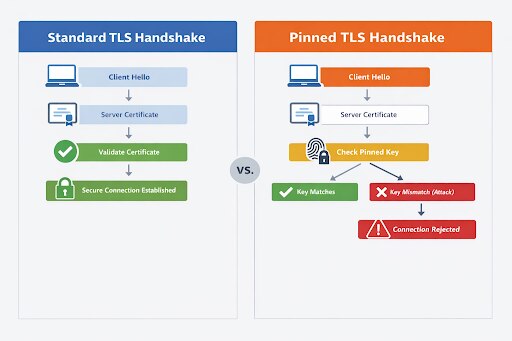
Listiche: Key Stages of a Pinning Failure
When a certificate pinning validation fails, it triggers a security protocol designed to protect the integrity of the data exchange. This process is immediate and uncompromising, ensuring that the application does not default to a vulnerable state.
Below are the key stages of a pinning failure and how they safeguard the user's connection.
- Detection: The app identifies a mismatch between the presented certificate and the PIN.
- Termination: The TLS handshake is aborted before any sensitive data is transmitted.
- Alerting: High-security apps often log these failures to detect potential MITM attempts.
- Prevention: User credentials and session tokens remain protected from interception.
Types of Certificate Pinning
Organizations choose between pinning the entire certificate or just the public key, depending on their security needs versus operational flexibility. Certificate pinning can be implemented in several ways depending on what the client is designed to trust, how often certificates change, and how much operational flexibility the environment requires.
| Type of Certificate Pinning | What It Pins | How It Works | Advantages | Limitations / Risks |
|---|---|---|---|---|
| Public Key Pinning | A specific public key or public key hash | The client trusts a defined public key rather than an exact leaf certificate | More flexible than leaf-certificate pinning because certificates can be renewed without breaking trust, as long as the same key remains in use | Still requires careful backup key planning; if the pinned key changes unexpectedly, connections can fail |
| Certificate Pinning | A specific certificate, often the leaf certificate | The client only trusts one exact certificate presented by the server | More precise and restrictive, which can strengthen trust in tightly controlled environments | More brittle; certificate renewal, reissuance, or CA migration can break the application until the client is updated |
| CA or Intermediate Pinning | A trusted certificate authority (CA) or intermediate certificate | The client trusts a defined CA or intermediate rather than only the end-entity certificate | More operational flexibility than leaf-certificate pinning while still narrowing the trust boundary | Broader trust scope than leaf or public key pinning, which may reduce precision |
| Static Pinning | Pinned values embedded directly in the app or client configuration | Trust values are hardcoded or preconfigured and remain fixed until the client is updated | Simpler to implement and easier to control in stable environments | Less agile; any certificate or key change may require an application or configuration update |
| Dynamic Pinning | Pinned values updated through a controlled mechanism | The client can receive updated pins without requiring a full application release | More agile and adaptable to certificate or infrastructure changes | More complex to design and operate; introduces trust bootstrapping and update security challenges |
Listiche: Static vs. Dynamic Pinning
- Static Pinning: The pin is hardcoded into the source code. It is highly secure but requires an app store update to change the certificate.
- Dynamic Pinning: The app fetches pins from a secure remote source. This offers more flexibility for certificate rotation but introduces its own identity security risks.
- Certificate Transparency: Combining pinning with CT logs provides an extra layer of oversight for issued credentials.
Why Pinning Is Essential for Zero Trust
Zero trust assumes that the network is always compromised and that default trust is a vulnerability. Relying solely on the CA system is a form of implicit trust. Certificate pinning aligns with zero trust by enforcing explicit verification of the server's identity.
By implementing pinning, organizations ensure that even if an attacker gains control over a network segment or a local gateway, they cannot decrypt the traffic. This is particularly vital for mobile banking, healthcare records, and cloud security where data must remain encrypted end-to-end without any possibility of "transparent" inspection by unauthorized third parties.
Certificate Pinning vs. Standard SSL/TLS
Understanding the difference between these two is critical for infrastructure architects. Standard TLS relies on a chain of trust, while pinning relies on a specific known entity.
| Feature | Standard SSL/TLS | Certificate Pinning |
|---|---|---|
| Trust Model | Hierarchical (Root CAs) | Direct (Point-to-Point) |
| Flexibility | High (Change any certificate) | Low (Tied to specific keys) |
| Security Level | Broad (Trusts any valid CA-issued certificate) | Narrow (Trusts only expected identities, resistant to CA compromise) |
| Maintenance | Low (Handled by OS) | High (Requires app management) |
Benefits of Certificate Pinning
Reduced MITM Risk
Certificate pinning helps defend against certain MITM attacks by rejecting connections to servers presenting unexpected certificates, even when those certificates might otherwise chain to a trusted CA. This narrows the attacker’s room to maneuver in cases involving fraudulent or misissued certificates.
Stronger Trust for High-Sensitivity Apps
Applications that handle banking data, healthcare records, privileged admin workflows, or other sensitive transactions may use pinning to impose stricter client-side trust requirements. In environments where the communicating endpoints are well known, that extra trust restriction can be useful.
Better Control in Known Client-Server Relationships
Pinning is most suitable where the organization controls both sides of the connection or at least has a highly predictable trust relationship. This is common in mobile apps tied to a specific backend, partner APIs using mutual TLS, and machine identity architectures where certificates and trust chains are centrally managed.
Risks and Limitations of Certificate Pinning
Certificate pinning can strengthen trust in high-assurance environments, but it also introduces real operational tradeoffs. If implemented too narrowly or without a clear certificate lifecycle strategy, pinning can cause outages, complicate recovery, and make routine infrastructure changes far harder than they need to be.
Operational Fragility
Here is the part marketing pages often tiptoe around: pinning can break things. Certificate renewals, CA changes, emergency key rotations, CDN changes, traffic inspection tools, or backend migration can all cause pinned clients to fail.
Android’s official guidance says certificate pinning is not recommended for Android apps because routine server-side certificate changes can force a client software update just to restore connectivity.
Outage Recovery Complexity
If teams pin too narrowly and do not maintain backup pins, they can lock themselves out during an incident. That is a big reason HPKP fell out of favor in browsers. It made recovery from certificate events harder and created “fail closed” scenarios that organizations sometimes triggered themselves.
Limited Value for General Web Browsing
For public websites accessed by standard browsers, HPKP is obsolete and unsupported. Certificate Transparency and other web PKI controls replaced that model in modern browser ecosystems. So a current Cyberpedia article should not imply that certificate pinning is still a mainstream browser hardening recommendation in 2026. It is not.
Not a Complete Security Strategy
Pinning protects against a narrow class of trust and interception problems. It does not replace secure coding, API security, access control, device trust, secret protection, or identity-aware policy enforcement. It is a tactical control, not a complete architecture.
When to Use Certificate Pinning
Certificate pinning makes the most sense when all of the following are true:
- The client-server relationship is tightly controlled.
- The backend certificate lifecycle is well governed.
- The organization can manage backup pins and update paths.
- The communications are high-value enough to justify the added operational overhead.
Good candidate scenarios include:
- Mobile apps connecting to a known backend
- Partner APIs using mTLS
- Internal service-to-service traffic in controlled environments
- Workload identity systems where certificates are centrally issued and rotated
When to Avoid Certificate Pinning
Organizations should be cautious about pinning when:
- The backend certificate chain changes frequently
- Multiple CDNs, proxies, or third parties terminate TLS
- The client update path is slow or unreliable
- The environment depends on enterprise TLS inspection or debugging proxies
- Standard platform trust mechanisms are sufficient for the risk level
That is why a more accurate 2026 recommendation is: use pinning selectively, not reflexively. Old guidance treated it like a gold star. Modern guidance treats it like a sharp tool. Useful, but very capable of cutting the operator.
Certificate Pinning Best Practices
- Pin Public Keys Instead Of Leaf Certificates When Possible: Public key pinning usually offers greater flexibility during certificate renewals than leaf-certificate pinning.
- Always Include Backup Pins: Android’s guidance explicitly recommends backup keys to ensure connectivity survives changes to certificates or CAs.
- Keep Normal Certificate Validation In Place: Pinning should complement hostname validation, expiration checks, and chain validation, not replace them.
- Use Automated Certificate Lifecycle Management: If you pin identities, you need disciplined issuance, renewal, and rotation processes. This is especially important in machine identity environments where certificates are numerous and short-lived.
- Limit Pinning To Appropriate Use Cases: Do not present certificate pinning as a universal web best practice. For browsers, HPKP is obsolete. For apps, deploy cautiously and only where the trust and operational model supports it.
Certificate Pinning and Machine Identity Security
Certificate pinning fits naturally into machine identity security because both disciplines focus on cryptographic trust between non-human entities. Machine identities often rely on X.509 certificates, certificate authority validation, and mutual TLS to authenticate workloads, APIs, and services.
In those architectures, pinning can serve as an additional trust restriction for particularly sensitive communications—but the bigger strategic control is strong machine identity lifecycle management, not pinning alone.
FAQs
Certificate pinning means a client trusts only a specific certificate, public key, or approved cryptographic identity when connecting to a server, instead of trusting any certificate the system would normally accept.
No. Pinning adds an extra trust check on top of normal TLS validation. The certificate still needs to pass standard validation rules.
No. HTTP Public Key Pinning for browsers is obsolete and no longer supported by modern browsers.
Android’s current official guidance says certificate pinning is not generally recommended because certificate changes can break connectivity and require app updates.
It is most useful in tightly controlled app, API, and machine-to-machine scenarios where the client-server relationship is known, and the organization can safely manage certificate changes.
Public key pinning is often more flexible than pinning a single leaf certificate, since certificates can be renewed while the key remains constant.


